Extended hours at Bells Corners — now open until 8:00 PM, Mon–Fri
1 (800) 409-19422006 Robertson Rd, Unit 16, OttawaFREN
The Bio-Test app for iPhone

Your lab results, the moment they’re ready.

Every value explained in plain language, with Bio-Test’s own reference ranges and your trend across visits. A card that checks you in at the desk. Booking at any of our 11 centres. Results from other labs, in the same place. Built by the lab that runs your tests, in Ottawa.

Coming to theApp StoreFree · English and French · Data stays in Canada
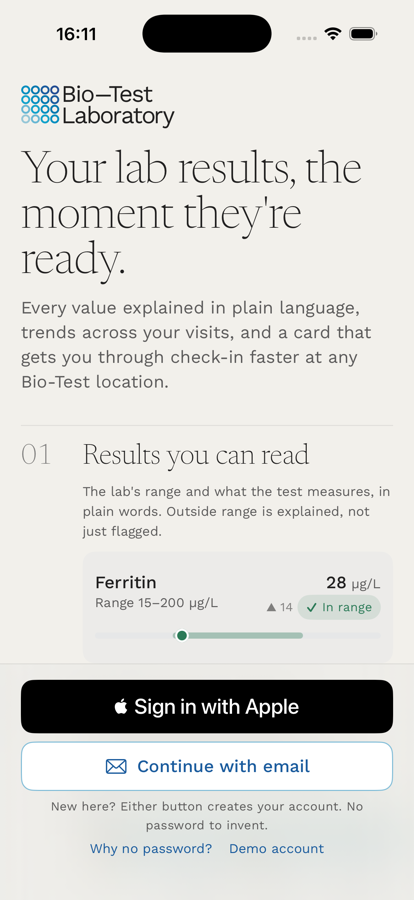
The Bio-Test app welcome screen: “Your lab results, the moment they’re ready”, with a ferritin result shown in range and Sign in with Apple and Continue with email buttons.
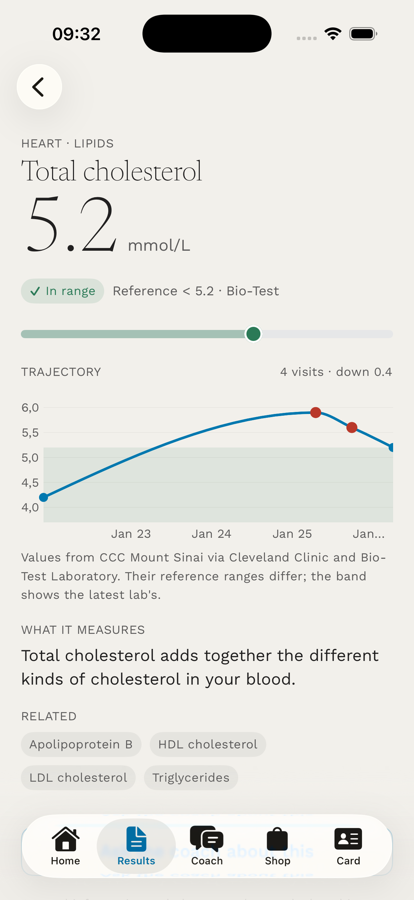
A total cholesterol result of 5.2 mmol/L shown in range against Bio-Test’s reference, with a trajectory chart across four visits and a plain-language note on what the test measures.
Results you can read

The number, the lab’s range,
and what it means.

Each result arrives the moment Bio-Test releases it, alongside the reference range our lab actually used, a plain-words explanation of what the test measures, and how the value has moved since your last visits. Anything outside the range is explained, not just flagged in red.

  • Bio-Test’s own ranges, not generic ones copied from the internet.
  • Plain language for close to a hundred common tests, in English and French.
  • Trends across visits, grouped by body system: heart, kidney, thyroid, iron, and more.
  • The original report as a PDF, to save or share with your doctor.
How every coach answer is built
  • The evidence, in general

    What the research says about this test, with the source named and linked.

  • Tied to your results

    Which of your results the question touches, and what the lab's range means for that test.

  • Questions for your doctor

    Anything specific to you becomes a question to bring to your next appointment.

Shown here in words rather than a screenshot: the coach is still in testing.

The coach

General information, with sources.
Never a diagnosis.

Ask what a test measures, why a value might drift, or what the research says about sleep and fasting glucose. The coach answers in general terms, cites where the information comes from, and points you back to your doctor for anything about you specifically. It does not diagnose, does not prescribe, and will not tell you to start or stop a medication.

  • Cited answers drawn from guidelines and published studies, with links.
  • Knows what was measured, so answers are about your tests, not a generic list.
  • Hands off to your clinician the moment a question turns into “what should I do?”.

The coach is an optional feature you turn on in Settings. It is not a medical service and does not replace advice from your physician or nurse practitioner.
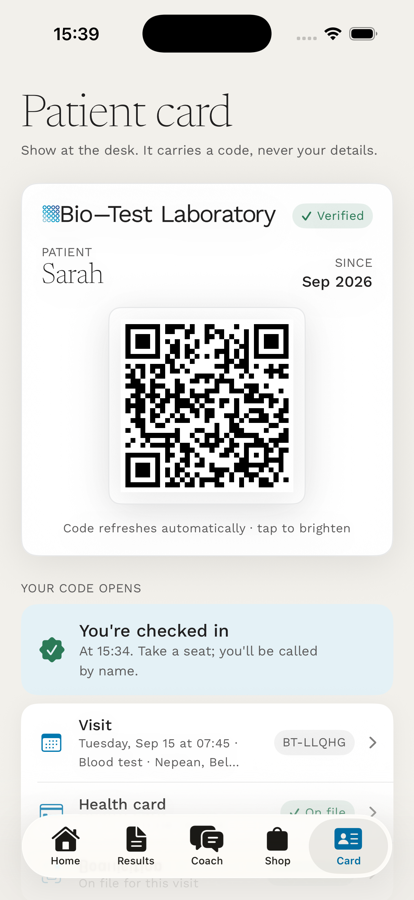
The Bio-Test patient card with a QR code, a green “You’re checked in” confirmation, and the upcoming visit and health card listed below.
Your card and check-in

Show your phone at the desk.
That’s the check-in.

Your patient card carries a QR code and nothing else: no name, no health card number. When the desk scans it, our system opens your booked visit, your health card on file, and the requisition you attached, so you hand over nothing at the counter and take a seat.

  • Health card on file: scan it once in the app; it stays on your phone and is checked at the desk.
  • Requisition attached to your visit: photograph the form your doctor gave you and the desk has your tests ready.
  • Code refreshes automatically and never contains your details.
  • Apple Wallet pass coming, so the card is on your lock screen when you arrive.
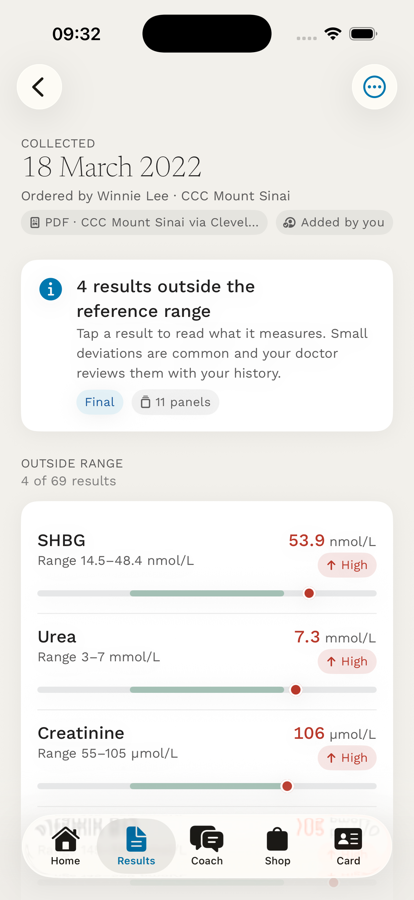
A report imported from another laboratory, labelled “PDF · CCC Mount Sinai” and “Added by you”, showing four results outside that lab’s reference range.
Bring your results together

Results from other labs,
in the same place.

Add a PDF from LifeLabs, Dynacare, a hospital portal or a lab outside Ontario, or photograph the printed report. The app reads the values on your phone, shows you a review table to check row by row, and only then saves them. Nothing is typed in by hand, and nothing is imported without a document behind it.

  • Marked “added by you” on every screen, with the issuing lab’s name.
  • Each lab keeps its own reference range; trends show which lab’s band you are looking at.
  • Read on your phone; the document is not uploaded until you confirm.
  • Units harmonised (mg/dL to mmol/L, for example) with the original kept in a note.
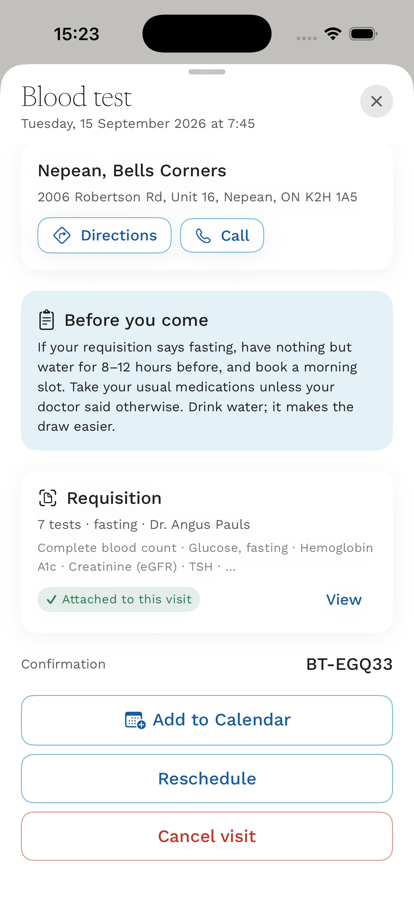
A booked blood test at Nepean, Bells Corners, with a “Before you come” fasting note and a seven-test requisition marked “Attached to this visit”.
Book and prepare

Book any of 11 centres.
Arrive knowing what to expect.

Pick the nearest patient service centre or the soonest slot, add it to your calendar, and attach your requisition to the visit. Before you come, the app tells you whether your tests need fasting and what that means in practice. Walk-ins are still welcome; the app just takes the waiting out of it.

  • Next available across Nepean, Smyth, Parkdale, Orléans, Carp, Embrun, Cornwall, Carleton Place and more.
  • Fasting guidance tied to the tests on your requisition.
  • Reschedule or cancel from the visit itself.
Connections you can switch on
  • Apple Health

    Read on your phone through HealthKit. Nothing is written back.

  • WHOOP and Oura

    Sign in to your account once; recovery, sleep and strain appear beside your results.

  • Training zones

    Five heart-rate zones from your own data, with the source shown.

Shown in words rather than a screenshot: these screens are still being finished.

Your body data

Bloodwork beside the rest
of your health data.

Connect Apple Health, WHOOP or Oura and see resting heart rate, sleep and workouts next to your lab results, on the same timeline. Training zones are calculated from your own data. Everything here is optional and off by default; turn it on in Settings if it is useful to you.

  • Apple Health: steps, heart rate, sleep and workouts, read from your phone.
  • WHOOP and Oura: connect your account; disconnect any time.
  • Training zones from your measured maximum heart rate.

Wearable data stays separate from your lab record and is never sent to your doctor.

Privacy and security

Your record stays in Canada,
under Ontario law.

Bio-Test Laboratory is the health information custodian for your results, the same as when you visit a centre. The app changes how you see them, not who is responsible for them.

  • Hosted in Canada

    Your data is stored and processed on servers in Canada and does not leave the country.

  • PHIPA

    Handled under Ontario’s Personal Health Information Protection Act, with Bio-Test as custodian.

  • Identity confirmed with your health card

    Your Ontario health card number, last name and date of birth are matched against our records before any result is shown.

  • No passwords

    Sign in with Apple or a one-time code sent to your email. Nothing to invent, reuse or forget.

  • Locked on your phone

    Face ID or your passcode after a short time in the background, and a privacy screen in the app switcher.

  • Export or delete

    Download everything as PDFs in one archive, or delete your data from Settings.

Read our privacy policy. Questions go to info@bio-test.ca.

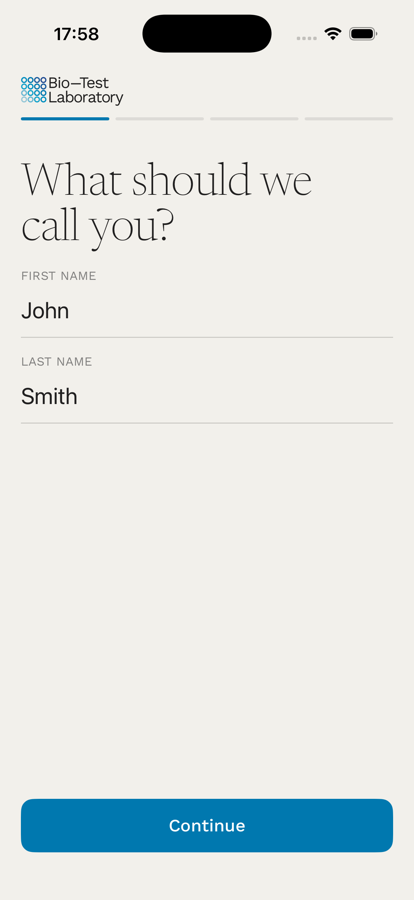
Sign-up step one of four asking for first and last name as they appear on the health card.
Launch list

Be first to know
when it’s in the App Store.

We are testing the app with Bio-Test patients now. Leave your email and we will send one message on launch day, with the link. Clinicians who want to see what their patients will see are welcome too.

Until then, results are available through the patient portal.

I’m a (optional)

One email at launch. No newsletter, and we don’t share your address with anyone.

Questions

About the app

Anything else, call our team or write to info@bio-test.ca with “app” in the subject line.

Call 1 (800) 409-1942

Yes. The app is free to download and free to use. Seeing your results, the explanations, trends, booking, the patient card and importing results from other labs cost nothing. There is no subscription.

iPhone first, through the App Store. It runs on recent versions of iOS and is available in English and French. An Android version is not scheduled yet; Android users can keep using the patient portal on the web.

We are testing the app with Bio-Test patients now and will publish it on the App Store once that testing is finished. We don't have a public date yet. Leave your email above and you'll get one message on launch day.

No. There is nothing to set up in advance. When the app launches you sign in with Apple or with a one-time code sent to your email, then confirm who you are with your Ontario number, last name and date of birth. There are no passwords to create or remember.

Your data is stored in Canada and handled under Ontario's Personal Health Information Protection Act (PHIPA), with Bio-Test Laboratory as the health information custodian. The app locks with Face ID, the patient card's QR code carries a random code rather than your details, and you can export or delete your data from Settings.

Not at launch. Each person signs in to their own account with their own . Adding a child or a parent you care for is planned for a later update, once the rules for minors' records are settled.

No. The coach gives general information with its sources, tied to what your results measure, and it never diagnoses, prescribes or tells you to change a medication. Questions about what a result means for you belong with your doctor or nurse practitioner, and the coach will say so.

Yes. Add the PDF you downloaded from their portal, or take a photo of the printed report. The app reads the values on your phone, shows you a table to check row by row, and only then saves them, marked as added by you with the issuing lab's name and its own reference ranges.

Today

Your results are in the patient portal now.
The app is on its way.